tekoäly, Yleisön ymmärtäminen & analytiikka

Part 2: How I rebuilt my personal AI assistant office on Claude Mods (pros and cons)

To make this 30 second video with a single prompt, my main assistant delegated the editing of the raw material (located in a folder on my computer) to my video subagent that uses Remotion technology.

In part one I built an “assistant office” in the browser. It was a small Python server running on localhost, with a web page on top. It looked nice (especially the pixel-art). It also meant one more server to start, keep alive and maintain.

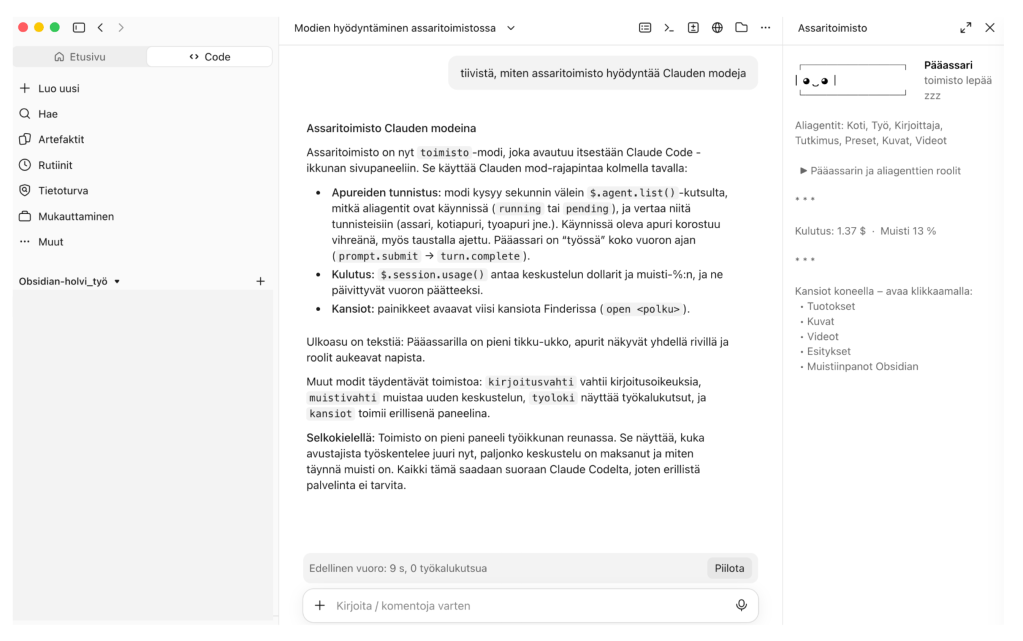
So I moved it, to the place I spent my time quite a lot anyway. The office now lives inside the Claude Code window as mods. Mods are small add-ons: panels, bars, notifications and guards. I’m not a programmer. I made them with Claude by describing what I wanted. It was quite simple since I knew what had worked well and what I wanted to improve.
What I carried over from the original office

  • Memory guard: reminds me when memory is over 60% full. Time to consider a new conversation.
  • Turn bar: shows how long the last turn took.
  • Folders: my five key folders open in Finder with one click.
  • Office: the main assistant is now a small stick figure. The helpers are plain text. Cost in dollars and memory percentage sit below. When a helper is working, its name turns green, so I see who is active. Needed? Perhaps not but I wanted to have this, haha.

Two mods are new: a write guard, which asks permission before Claude writes to Slack, email, calendar, Jira, Confluence or GitHub (reading doesn’t ask), and a work log of what the helpers are doing right now.

I do have a few automations running with Claude Routines to my Slack but those are not part of my assistant office. Its not needed.

The helpers
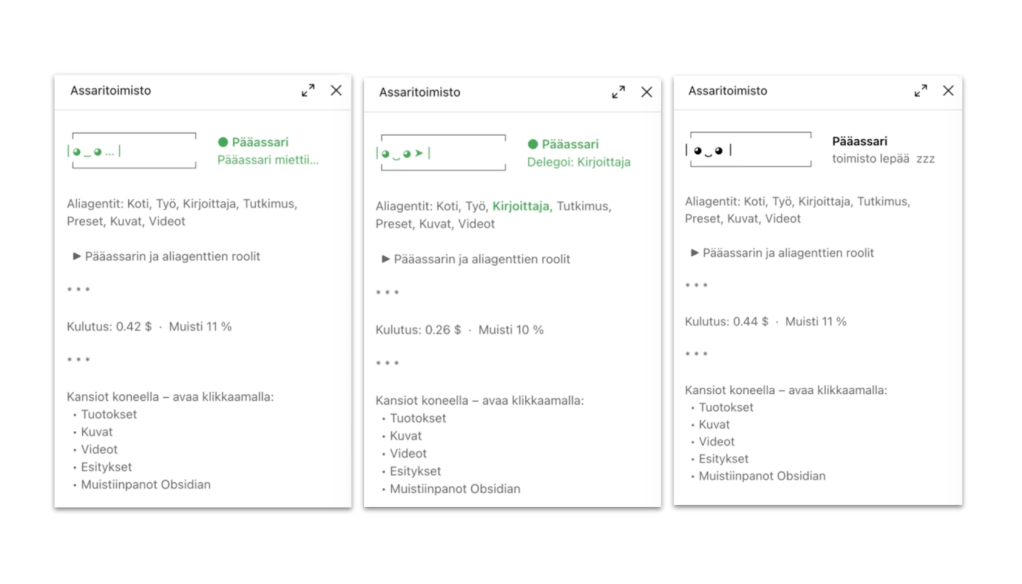
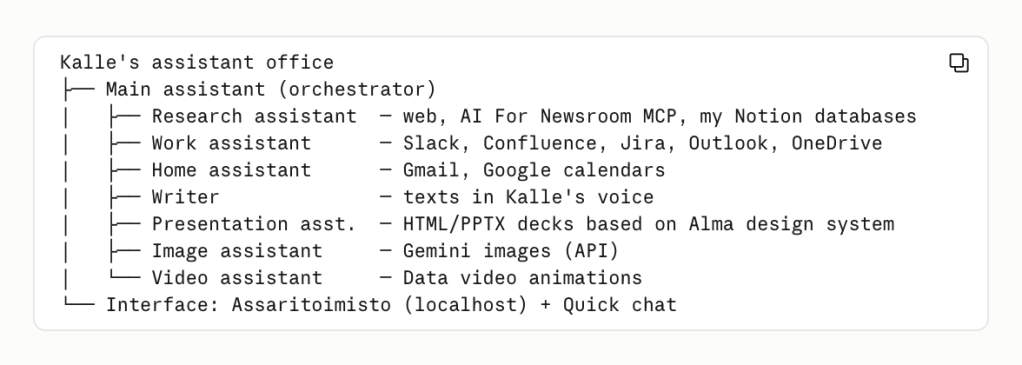
  • Main assistant: understands the request, delegates, and answers me.
  • Home helper: reads my private email and calendars.
  • Work helper: reads my work tools such as Slack, Sharepoint, Outlook, Confluence etc.
  • Writer: drafts posts and texts in my voice if I want.
  • Research helper: searches the web and cites sources. Is connected to a few MCP’s as well, and my Notion-table that includes information about AI use cases in media.
  • Presentation helper: makes slide decks in an Alma brand template based on sa specific design system.
  • Image helper: generates one image at a time, on request. Uses Gemini API and Magnific API.
  • Video helper: makes and edits videos, and transcribes audio locally.

The folders

  • Output (everything the assistant produces)
  • Images
  • Videos
  • Presentations
  • Notes (my Obsidian vault)

What works

  • Everything is in the same window as the work.
  • No server, no browser tab to keep alive.
  • The guards give some more control.
  • Cost and status are always visible.
  • New mods are easy to add.

What doesn’t

  • It still only works in Claude Code, as a wholesome assistant office. Not in chat, not on mobile. I actually don’t want to add remote controls for this at least as of yet. I can for example use all of my connectors normally via basic Claude chat from phone, that is quite enough.
  • It’s text and a stick figure, not pixel art. The old office is still usable if I want to get back to it (it launches via an app button on my Mac).
  • The mod technology is new and changing. It is not always easy to discover what works with what.

My takeaway: I think I’ve traded looks for better control and easier upkeep. But we will see what happens in the future. What I’ve noticed anyway now is that my agent office has become my number one place where I use Claude. A good sign I think. And more importantly, I feel that it makes my life easier in quite a few ways.

The future? I’m looking forward to testing Claude Duet or ChatGPT Dots at some point since the idea of 24/7 agents doing stuff for you proactively is quite alluring. But still, I’d like to semi-build something my self rather than get something off-the-shelf.
Normaali
tekoäly

How I built my personal AI assistant office, working in media (pros and cons)

Testing the Gemini image generation API via my assistant. Skip to the end to see the result (two monkeys instead of one, haha).

An honest TLDR: This is an ongoing project that will probably never end. But an extremely interesting one. Is it useful? Definitely? Is it perfect? No.

So, as you might know, I’m not a programmer at all but I have had quite a clear idea of how I would like this thing to work. I built this by vibe-coding in Claude Code and made gradual changes along the way. One inspiration has been my friend Jaakko’s own experiment that you can read about here (opens to another tab).

The idea

Instead of one chatbot that tries to do everything, I made a small office. One lead assistant (orchestrator agent) understands what I want and decides who does the work. Specialist helpers do most the actual jobs. Basically I started with prompting and planning first with my Claude, listing my wishes and finding out what’s realistic. I connected my assistant to Codex as well for a while but disconnected it after testing fo the time being.

The structure

  • Lead assistant (Pääassari). It talks to me, decides whether to delegate, hands out clear assignments, and assembles the results. It’s rulebook is mainly one CLAUDE.md file in my Obsidian vault, plus a general one that applies to all my Claude Code projects on my computer.
  • Seven specialist helpers. Each is one short text file in .claude/agents/, with a job description and a limited set of tools:
    • Research helper (Tutkimusapuri): web search, plus a database of how newsrooms use AI. OSINT: no tools of its own but and the instruction to look tools up from a public directory. This is also connected to my Notion databases where I’ve collected some observations from media industry via a Claude automation.
    • Work helper (Työapuri): connects to my Slack, Confluence, Jira, work email and calendar, Sharepoint.
    • Home helper (Kotiapuri): reads my personal Gmail and family calendars. Read-only but lead assistant writes calendar entries if I confirm.
    • Writer (Kirjoittaja): drafts Linkedin posts and blogs in my voice, using a style guide.
    • Presentation helper (Preseapuri): makes on-brand slide decks (HTML and PowerPoint), based on Alma Media design system.
    • Image and video helpers (Kuva-apuri, Videoapuri): images via Gemini API (a personal one), animated data videos from chart screenshots.
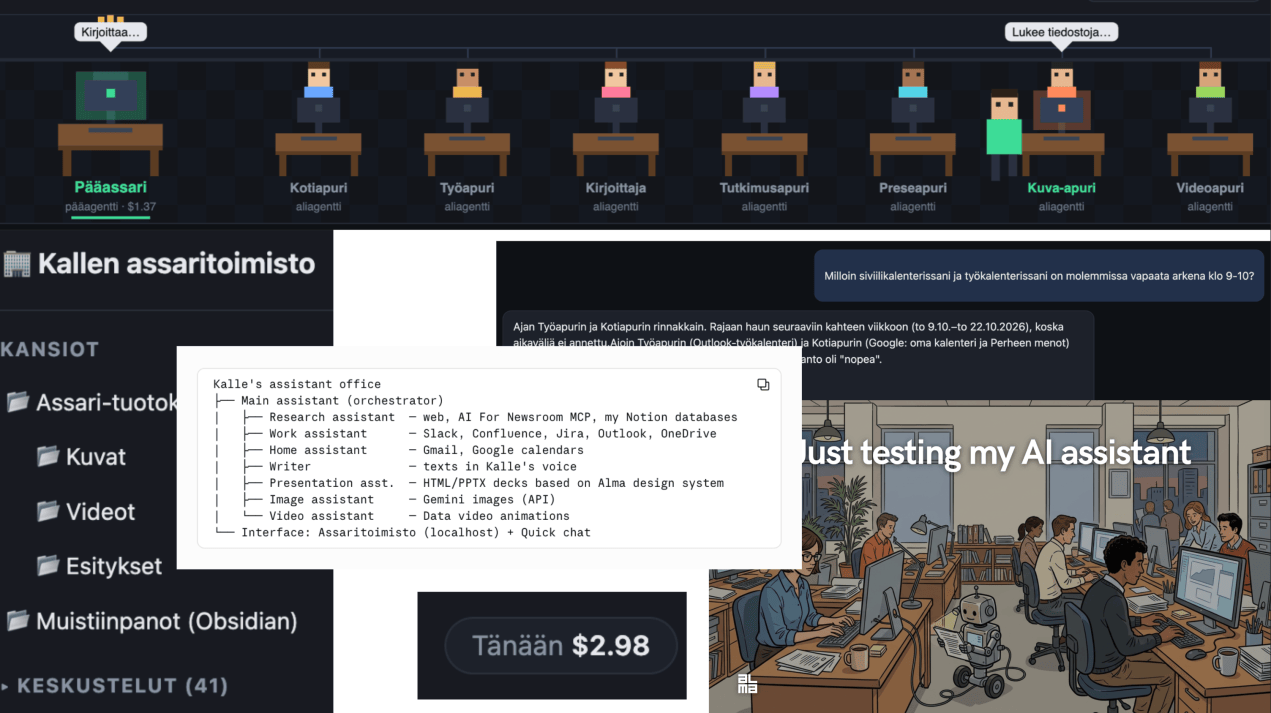
  • The office itself. A browser app where each helper has a pixel-art desk (inspiration for the pixel-art came e.g. from Ippen Media’s Markus Frantz), and the lead assistant walks over to the one it delegates to. Under the hood, a small local Python server runs Claude Code.

The expense tracker: knowing what the office costs

AI helpers cost real money for every run, so I built cost tracking into the office.

  • Every answer is priced. After each run, Claude Code reports the cost in dollars. My office server (palvelin.py) records it with the date and the helper that did the work, and saves it all in a local data.json file.
  • Three views.
    • A ”Today” counter at the top of the office shows total spend for the day.
    • Each helper’s desk shows what that helper has cost today.
    • Each conversation in the sidebar shows its own running cost, and a memory bar shows how full the conversation is.
  • Claude Code’s own status line (~/.claude/statusline.sh) shows the same two numbers in the terminal: the session’s cost and how full the memory is.
  • The tracker changes how I work.
    • The lead assistant sizes up each request (light, medium or heavy) and warns me before heavy runs such as deep research, many images or video rendering. It also offers a cheaper alternative.
    • Long conversations get expensive, because every message rereads the whole history. So the assistant suggests a fresh, short conversation once the memory bar passes 60%.
    • It also led to the cheap ”Pikachat” quick-chat mode, with its own separate cost line.

The rules that make it (at least a bit more) trustworthy

  • Read-only by design. The helpers that touch work and personal data have no write tools at all, so a mistake can’t send an email or edit a Jira ticket. Writing happens only when I explicitly ask, in the main session.
  • Confirm before saving. Nothing goes into the vault, GitHub or Jira without asking me first.
  • Work and personal stay apart. If it’s unclear, the assistant asks ”work or personal?”
  • Cost awareness. See the tracker above. The assistant doesn’t guess dollar amounts. It reads the real figures from get_usage -tool.

Where Obsidian fits

Obsidian is the memory of the office, my ”second brain.” The assistant lives in the vault folder, so everything it learns about me and my writing sits next to my own notes.

  • Two parts. Muistiinpanot/ holds my observations, ideas and learning notes. Blogi-arkisto/ holds about 225 of my published blog posts since 2017, which serve as reference material for my writing voice.
  • The assistant writes, but only with permission. It can write straight into the vault, but it always asks first. At the end of a conversation it asks, ”Should I save a note from this?”
  • Obsidian Sync carries the notes to my other devices automatically.
  • Not for project management. For me, the Obsidian vault is for thinking.

Pros and cons so far

A presentation test based on Alma design system.

Pros

  • I’ve noticed that I want to actually use this regularly and develop it further. Thats a good sign. Sometimes I find using this inside Claude Code as well but its not as fun.
  • Having this as a Chrome tab is a great place for it to be because Chrome is the place I use most (Claude I use in the desktop app).
  • The assistant sees my real notes and blog archive, so it writes, at best, in my voice.
  • Read-only helpers and ask-first rules make delegating to AI feel safer.
  • The cost tracker shows spending per helper and per conversation. This was a good thing to add.
  • Obsidian Sync is good to have.

Cons

  • Obsidian Sync has no API, so Claude’s ”normal” chat and my phone can’t read the vault so far. The workaround like a OneDrive mirror or a private GitHub repo isn’t decided yet.
  • The assistant only works so far in Claude Code, so it is tied to my computer. I would not like to set up a virtual server or buy a second computer just for this.
  • The setup is a bit fiddly.
  • The vault has only about a dozen notes so far, so the ”second brain” payoff depends on me keeping it fed. I am still not very convinced Obsidian is as good as some people say.
Normaali